
Why Most RAG Systems Fail in Production (And How to Fix Them)
Most people think RAG (Retrieval‑Augmented Generation) is simple:
chunk your data
create embeddings
retrieve results
And honestly, that works perfectly in demos/MVPs. But in production, it breaks badly. After building multiple real‑world RAG systems, I’ve learned something important:
The problem is rarely a single component. The problem is how everything works together.
Let me walk you through where things actually fail and how to fix them.
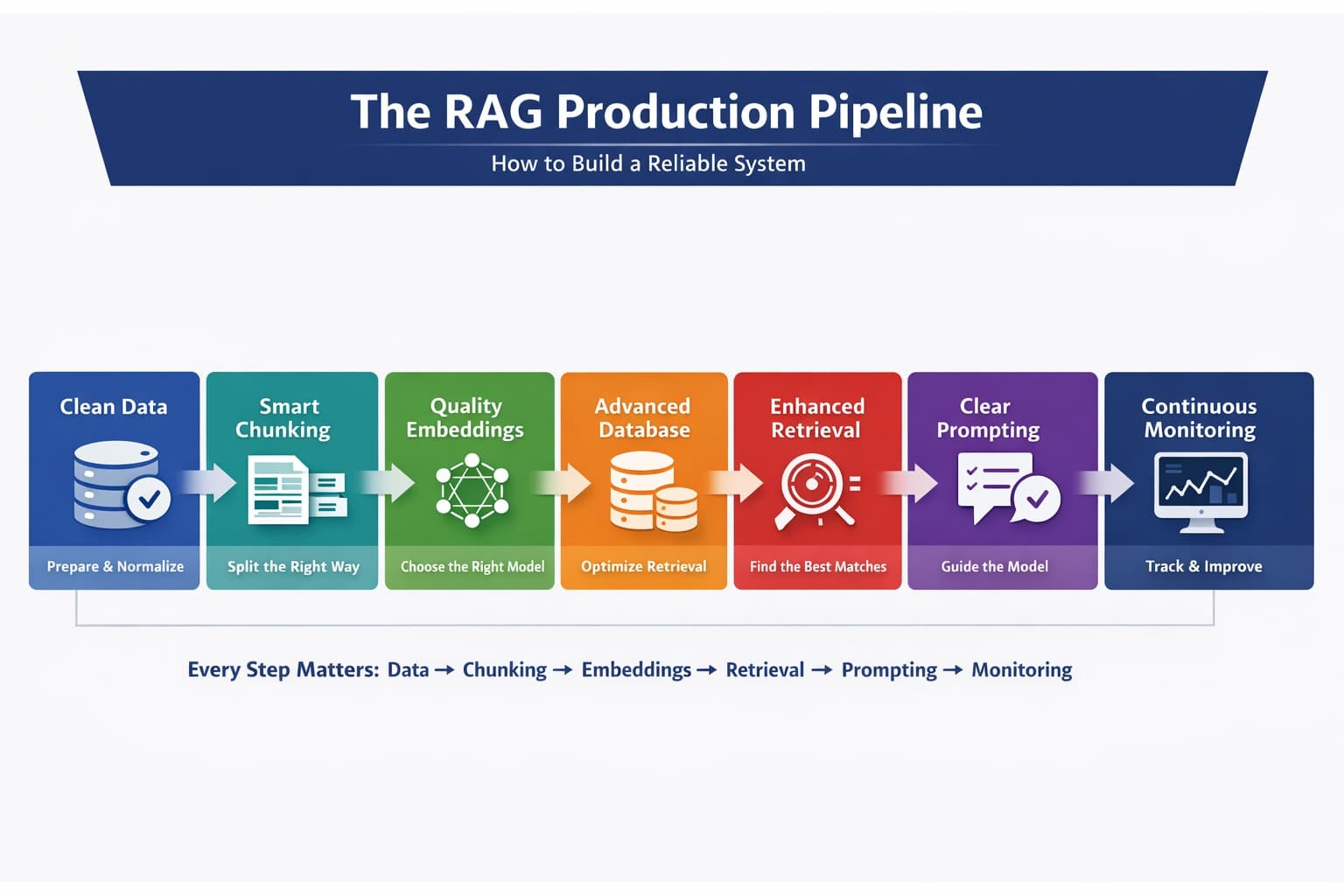
1) Data ingestion where most problems start
Before you even think about AI, your data needs to be clean. Most systems fail here because they ignore this step.
In real-world data, you’ll find:
HTML tags, scripts, and junk content
duplicate or near‑duplicate information
messy structure (pages that mix docs, code, and UI text)
missing or implicit context (no source, no timestamps)
If you index this as‑is, your system will:
waste tokens on irrelevant text
retrieve noisy or duplicated content
confuse the model and increase hallucinations
What works in production:
clean the data (strip HTML, remove scripts, normalize whitespace)
deduplicate (hashing + fuzzy matching)
preserve structure (headings, lists, code blocks)
attach useful metadata (source, category, author, timestamps, URL)
normalize language variants and common abbreviations
This step alone often improves results more than upgrading the model.
2) Chunking
Most people split text like 500 tokens + some overlap. Sounds reasonable, right?
But here’s the problem: you’re breaking meaning.
Let’s say your document says:
To connect to the database, first initialize the client using your API key. Once initialized, you can execute queries.
Now imagine this gets split into two chunks.
If a user asks:
👉 “How do I execute queries?”
The system might retrieve only the second part:
“Once initialized, you can execute queries…”
But now something is missing
👉 How do you initialize it?
So the model tries to fill the gap, and that’s where hallucinations start.
Instead of blindly splitting text:
use structure-based chunking (headings, sections)
use semantic chunking (group related ideas)
Bad chunking cuts ideas in half. Good chunking keeps ideas complete and in production, this directly affects answer quality.
3) Embeddings
Now let’s talk about embeddings. In the beginning, most teams pick a small, cheap model.
It’s fast. It works. It looks good. Until real users show up. Users don’t ask clean questions. They ask things like:
“why db not connecting”
“payment issue fix urgent”
“api not working after update”
Suddenly:
relevant results are missed
answers feel “slightly off."
So you upgrade to a better model.
Now:
search improves
results make sense
answers feel reliable
But your cost increases
The Real Decision
It’s not about picking the “best” model.
It’s about balance:
smaller models → cheaper, but less accurate
larger models → better results, higher cost
In production you choose what fits your users, your data, and your budget.
4) Vector database
Early on, tools like FAISS or Chroma work great. But as you scale, you realize storage is not the problem but retrieval quality is
This is where production-grade systems matter.
Modern vector databases offer
hybrid search (keyword + semantic)
metadata filtering
fast and scalable queries
These features are not “nice to have” they are what make your system reliable.
5) Retrieval
In demos, retrieval looks easy: take a query → find top results → done, but real users don’t behave like demo users.
They:
ask vague questions
use wrong terms
write incomplete sentences
So even if the answer exists, your system might not find it
What Actually Works
Production systems improve retrieval in layers:
- Hybrid Search
Combine keyword + semantic search
useful when exact terms matter (e.g., “API key," “error 500”)
- Query Rewriting
Fix the user’s question before searching
“how fix db issue” → “how to fix database connection issues”
- Reranking
Reorder results using a stronger model
ensures the best answer comes first
This is often the biggest accuracy boost.
6) Prompting — The Final Layer
Even if everything works the final answer depends on your prompt
A common mistake:
sending raw context to the model
hoping it figures things out
This is where hallucinations happen.
Example
User asks:
“What is the refund policy?”
But your data doesn’t contain the answer.
Without control, the model might make something up
The Fix
Structure your prompt clearly:
define the role of the assistant
include the user query
pass retrieved context
And most importantly:
Add strict rules:
“Answer only from the provided context."
“If the answer is not found, say you don’t know."
This keeps your system honest.
7) Monitoring
Here’s the truth: even after building everything, you still don’t know if it works until you track it.
What You Need to Monitor
which chunks were retrieved
which queries failed
where hallucinations happened
token usage and cost
Because when something goes wrong, you need to know:
Was it retrieval?
Was it chunking?
Was it the prompt?
Why This Matters
A production RAG system is not “set and forget." It improves over time only if you observe and fix it continuously
Final Thought
RAG is not just
chunking
embeddings
retrieval
That’s the demo version.
Real-world RAG is a system where:
data quality
chunking strategy
retrieval pipeline
prompting
monitoring
All work together and if even one part is weak the whole system breaks
If you’re building a RAG system for your product or business, focus less on “which model to use” and more on how the entire pipeline works together.