
Multi-Tenancy: Pick Your Isolation Model
Every SaaS app faces this question early. How do we keep one customer’s data separate from another’s?
This decision affects your cost, performance, security, and future complexity. There’s no perfect choice, each model fails in its own way. Here’s a practical way to think about it.
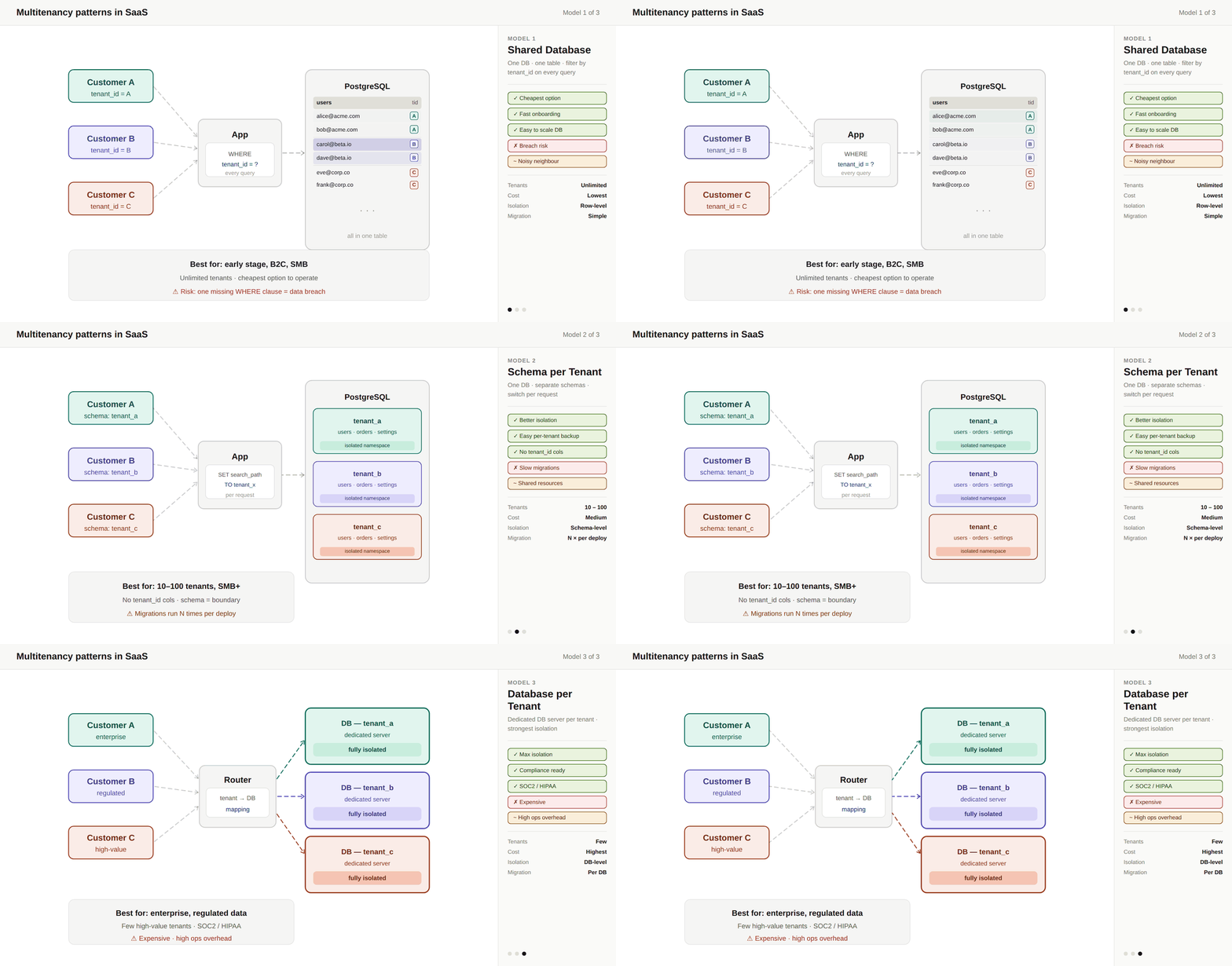
Model 1: Shared Database, Shared Schema

One database. One schema. All tenants share tables.
Each row includes a tenant_id.
How it works
All customers live in the same tables
Every query filters by
tenant_idSingle schema, single migration path
Why teams start here
Lowest cost
Fastest to build and ship
Simple operations
Great for small tenants and early-stage products
Where it breaks
Missing a
WHERE tenant_id= data leak riskNoisy tenants affect everyone
Hard to export or isolate tenant data
Weak story for enterprise security questions
When to use
Early-stage SaaS
Small tenants
Fast onboarding matters
Model 2: Shared Database, Schema per Tenant

One database, separate schemas per tenant.
Example: tenant_a.users, tenant_b.users
How it works
Same database server
Each tenant has its own schema (namespace)
App switches schema per request
Why teams move here
Better isolation (no accidental cross-tenant queries)
Easier per-tenant backups and exports
Some flexibility for tenant-specific customization
Where it breaks
Migrations run per tenant → slow at scale
Connection management gets complex
Database limits (too many schemas hurt performance)
Still shared resources → noisy neighbors remain
When to use
10 < 100 of tenants
Need stronger isolation than shared schema
Not ready for full database separation
Model 3: Database per Tenant

Each tenant gets its own database server.
How it works
New tenant = new database
App routes requests to the correct database
Backup, scaling, and tuning per tenant
Why teams choose this
Strongest isolation
Clean enterprise story (“your data is fully isolated”)
Easier compliance (SOC 2, HIPAA, data residency)
Simple deletion (drop database)
Independent performance tuning
Where it breaks
Expensive (idle resources per tenant)
Operational overhead (hundreds/thousands of DBs)
Migrations become harder to coordinate
Cross-tenant analytics is complex
Provisioning is slower
When to use
Enterprise customers
Regulated data
Few but high-value tenants
Reality: Most SaaS Apps Use All Three
Mature SaaS systems rarely stick to one model.
They tier isolation based on customer value:
Free / small → shared schema
Mid-market → schema per tenant
Enterprise → dedicated database
Customers paying more expect stronger isolation.
The Real Challenge: Design for Flexibility
The key is not picking the “perfect” model. It’s designing your system so you can change models later without rewriting everything.
How to Choose Today
Ask yourself:
1. Who is your customer?
SMB / self-serve → shared schema
Enterprise → stronger isolation
2. What’s your risk tolerance?
Can tenants impact each other?
Handling financial/health data → isolate more
3. How fast must onboarding be?
Instant signup → shared models
Enterprise deals → slower provisioning is fine
Common Mistakes
Starting with database-per-tenant too early → high ops burden
Adding isolation (like RLS) too late → painful rewrites
Forgetting
tenant_idin indexes → performance issuesDesigning analytics assuming shared data → breaks later
Treating isolation as only a database problem
Isolation must also cover:
Caches
Queues
Logs
Search indexes
Final Thought
Pick the model that fits your current customer and stage. But design your system so you can change later.